Welcome listeners, today I'll show you - " How to upload a file in PHP with proper validation "
Ok, start our tutorial:
Step 01 :
Create a PHP file named index.php like this:
<html>
    <head>
        <title>File Upload in PHP with proper validation:</title>
        <style>
            body {
                background: #263238;
                min-height: 100%;
                color: #FFF;
                font-size: 16px;
                padding: 10px;
                font-family: inherit;
            }
            .container{
                padding-right: 15px;
                padding-left: 15px;
                margin-right: 10%;
                margin-left: 10%;
                margin-top: 5%;

            }
            input{
                font-weight: 300;
                outline: none;
                box-shadow: none;
                height: 40px;
                background: transparent;
                border-radius: 0px;
                padding:10px;
                color: #FFF;
            }
            fieldset {
                padding: 5%;
            }
            input[type="submit"] {
                background: #00897B;
                border-radius: 10px;
                cursor: pointer;
            }
            input[type="submit"]:hover {
                background: #AD1457;
            }
            input[type="text"] {
                width: 50%;
                border: 1px solid #00897b;
            }
            input:active,input:hover, input:focus {
                border: 1px solid #43A047;
            }
            legend {
                font-size: 20px;
                color: #43dccf;
                font-weight: bold;
            }
        </style>
    </head>
    <body>
        <div class="container">
            <form method="post" enctype="multipart/form-data">
                <fieldset>
                    <legend>File Upload System</legend>
                    <label>Enter Your Name :</label>
                    <input type="text" name="name" placeholder="Enter name" /><br/>
                    <label>Choose a file to upload :</label>
                    <input type="file" name="upload_file" /><br/>
                    <input type="submit" name="submit_file" value="Upload File" /><br/>
                </fieldset>

            </form>
        </div>
    </body>
</html>
Ok,Now demonstrating the code.
1) First we make a form in our body tag and look this line
<form method="post" enctype="multipart/form-data">
In this line enctype will be multipart/form-data we have to give it must. If we don't give it then it won't recognize any file that he's present or not. and method = post that means we don't want to show the file name and input name to the browser.
2) Which field we want to upload anything or give any name then we need to name it, reason: php works by the name of any field. So we give name to our name and file name.
3) And obviously by adding some pretty CSS our looking style is awesome.
And so, now our HTML and CSS style has completed and so our output in browser will be:
 Step 02 :
Ok Now it's time to go to our PHP code of uploading any image with checking if the file is .jpg. .png, .jpeg, .gif format. For being that first create a folder called upload where we'll upload our images.
Step 02 :
Ok Now it's time to go to our PHP code of uploading any image with checking if the file is .jpg. .png, .jpeg, .gif format. For being that first create a folder called upload where we'll upload our images.
<?php
8 if (isset($_POST['submit_file'])) {
9
10 $name = $_POST['name'];
11 $directory = "upload/";
12 $file_name = $directory . basename($_FILES["upload_file"]["name"]);
13 $file_size = $_FILES["upload_file"]["size"] / 1000;
14 $file_type = pathinfo($file_name, PATHINFO_EXTENSION);
15 $check_file_exist = file_exists($file_name);
16 echo 'Hello '. $name . '<strong><br/>File Specification is :</strong>'
17 . '<br>File name :' . $file_name . '<br>File Size : ' . $file_size . 'KB<br>File Type : ' . $file_type . '<hr>';
18
19 if ($check_file_exist) {
20 echo 'Sorry!! File is already existed in the <span class="mark">' . $directory . '</span> directory';
21 } else if ($file_size > 2000) {
22 echo 'File is greater than 2MB!! Please select a file of less than 2MB';
23 } else if ($file_type != 'jpg' && $file_type != 'png' && $file_type != 'jpeg' && $file_type != 'gif') {
24 echo 'File Type is : ' . $file_type . ' Sorry!! Only upload a jpg, png, jpeg or gif format image file';
25 } else {
26 move_uploaded_file($_FILES["upload_file"]["tmp_name"], $file_name);
27 echo 'File has uploaded successfully in <span class="mark">' . $directory . '</span> directory';
28 }
29 }
30 ?>
Code Demonstration:
line 8 -
if (isset($_POST['submit_file'])) {
Check if the submit button has clicked or not. If submit button is clicked then do the above thing.
line 10 -
$name = $_POST['name'];
Get the name from that input field.
line 12 -
$file_name = $directory . basename($_FILES["upload_file"]["name"]);
By this, we get the file name with directory that means - Suppose you upload a file named 1.jpg then total $file_name = upload/1.jpg
line 13 -
$file_size = $_FILES["upload_file"]["size"] / 1000;
Get the File size of that file. We have divided it by 1000 to convert file from byte to kilobyte (KB)
line 14 -
$file_type = pathinfo($file_name, PATHINFO_EXTENSION);
Get the file type or extension of uploaded file in php.
line 15 -
$check_file_exist = file_exists($file_name);
Check the file if the file which is selected exists or not in the upload folder. If the file exists then it returns TRUE otherwise FALSE.
line 16 to 17 -
echo 'Hello '. $name . '<strong><br/>File Specification is :</strong>'
 '<br>File name :' . $file_name . '<br>File Size : ' . $file_size . 'KB<br>File Type : ' . $file_type . '<hr>';
In this line of php code we've show that the files specification to the browser.
line 19 to 28 -
 19     if ($check_file_exist) {
 20         echo 'Sorry!! File is already existed in the <span class="mark">' . $directory . '</span> directory';
 21     } else if ($file_size > 2000) {
 22         echo 'File is greater than 2MB!! Please select a file of less than 2MB';
 23     } else if ($file_type != 'jpg' && $file_type != 'png' && $file_type != 'jpeg' && $file_type != 'gif') {
 24         echo 'File Type is : ' . $file_type . ' Sorry!! Only upload a jpg, png, jpeg or gif format image file';
 25     } else {
 26         move_uploaded_file($_FILES["upload_file"]["tmp_name"], $file_name);
 27         echo 'File has uploaded successfully in <span class="mark">' . $directory . '</span> directory';

 28     }
In this line of php code we've show that the files specification to the browser.
In these lines I've just made an if-else statement to validate some conditions. I think all is cleared to you. And look at line 26.
26 move_uploaded_file($_FILES["upload_file"]["tmp_name"], $file_name);
Here, php has a function called move_uploaded_file($file_name_temporary, $file_name_with_directory) to move a file to the temporary directory to permanent directory.
That's the complete of how to upload a file to a directory or folder in php with validation.
File Viewing System in PHP:
Now we'll learn how to get all the images/files of any directory in the above example.
Code:
113 <div class="show">
114 <h2>Show all the images of Upload directory :</h2>
115 <div class="images">
116
117 <?php
118 $dirname = "upload/";
119
120
121 $images = glob($dirname . "*");
122
123
124 if (count(glob("$dirname/*")) != 0) {
125 foreach ($images as $image) {
126 echo '<img style="width:200px; height:120px" src="' . $image . '" /> ';
127 }
128 }else{
129 echo "Sorry!! There is no images to show..";
130 }
131 ?>
132 </div>
133 </div>
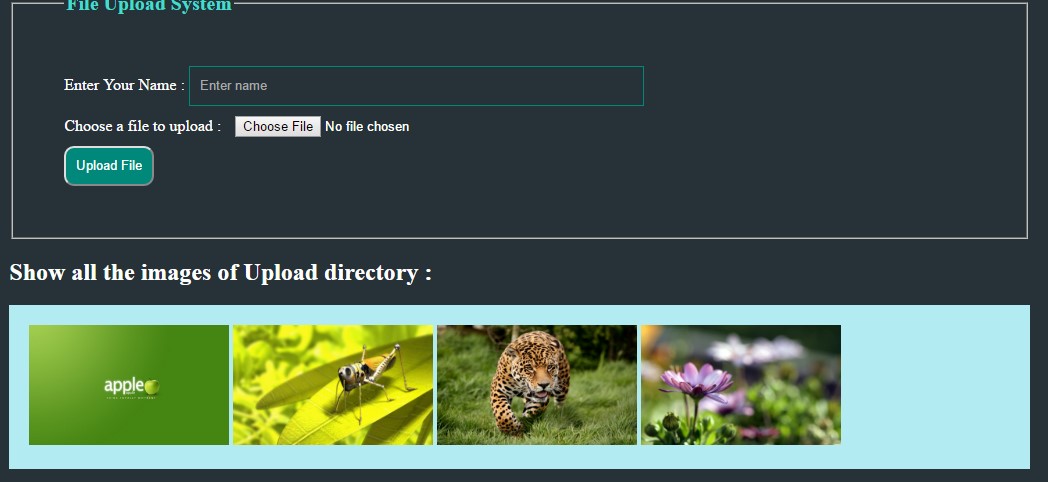
And see the output if there is four images images in the folder:
And if no image then output will be like:

Ok Now Code Demonstration:
Line -121:
$images = glob($dirname . "*");
In this line of code by php globe function. From PHP documentation:
| Type:
|
array
|
| Description:
|
an array containing the matched files/directories, an empty array if
no file matched or FALSE on error.
On some systems it is impossible to distinguish between empty
match and an error.
|
So, if the directory has any image it will return array containing files.
Line 124 to 130:
124 if (count(glob("$dirname/*")) != 0) {
125 foreach ($images as $image) {
126 echo '<img style="width:200px; height:120px" src="' . $image . '" /> ';
127 }
128 }else{
129 echo "Sorry!! There is no images to show..";
130 }
That means if directory has not contain any image then it will just echo that there is no image and if there is an image then it'll display all of the images.
Thanks for viewing our lecture. Now get the full code in one file with CSS and PHP.
<!--
<?php
if (isset($_POST['submit_file'])) {
$name = $_POST['name'];
$directory = "upload/";
$file_name = $directory . basename($_FILES["upload_file"]["name"]);
$file_size = $_FILES["upload_file"]["size"] / 1000;
$file_type = pathinfo($file_name, PATHINFO_EXTENSION);
$check_file_exist = file_exists($file_name);
echo 'Hello '. $name . '<strong><br/>File Specification is :</strong>'
. '<br>File name :' . $file_name . '<br>File Size : ' . $file_size . 'KB<br>File Type : ' . $file_type . '<hr>';
if ($check_file_exist) {
echo 'Sorry!! File is already existed in the <span class="mark">' . $directory . '</span> directory';
} else if ($file_size > 2000) {
echo 'File is greater than 2MB!! Please select a file of less than 2MB';
} else if ($file_type != 'jpg' && $file_type != 'png' && $file_type != 'jpeg' && $file_type != 'gif') {
echo 'File Type is : ' . $file_type . ' Sorry!! Only upload a jpg, png, jpeg or gif format image file';
} else {
move_uploaded_file($_FILES["upload_file"]["tmp_name"], $file_name);
echo 'File has uploaded successfully in <span class="mark">' . $directory . '</span> directory';
}
}
?>
<html>
<head>
<title>File Upload in PHP with proper validation:</title>
<style>
body {
background: #263238;
min-height: 100%;
color: #FFF;
font-size: 16px;
padding: 10px;
font-family: inherit;
}
.container{
padding-right: 15px;
padding-left: 15px;
margin-right: 10%;
margin-left: 10%;
margin-top: 5%;
}
input{
font-weight: 300;
outline: none;
box-shadow: none;
height: 40px;
background: transparent;
border-radius: 0px;
padding:10px;
color: #FFF;
}
fieldset {
padding: 5%;
}
input[type="submit"] {
background: #00897B;
border-radius: 10px;
cursor: pointer;
}
input[type="submit"]:hover {
background: #AD1457;
}
input[type="text"] {
width: 50%;
border: 1px solid #00897b;
}
input:active,input:hover, input:focus {
border: 1px solid #43A047;
}
legend {
font-size: 20px;
color: #43dccf;
font-weight: bold;
}
.mark{
background: #F44336;
padding: 5px;
border-radius: 10px;
border: 1px solid gray;
}
.show{
}
.images {
background: #B2EBF2;
padding: 20px;
color: red;
}
</style>
</head>
<body>
<div class="container">
<form method="post" enctype="multipart/form-data">
<fieldset>
<legend>File Upload System</legend>
<label>Enter Your Name :</label>
<input type="text" required="required" name="name" placeholder="Enter name" /><br/>
<label>Choose a file to upload :</label>
<input type="file" required="required" name="upload_file" /><br/>
<input type="submit" name="submit_file" value="Upload File" /><br/>
</fieldset>
</form>
<div class="show">
<h2>Show all the images of Upload directory :</h2>
<div class="images">
<?php
$dirname = "upload/";
$images = glob($dirname . "*");
if (count(glob("$dirname/*")) != 0) {
foreach ($images as $image) {
echo '<img style="width:200px; height:120px" src="' . $image . '" /> ';
}
}else{
echo "Sorry!! There is no images to show..";
}
?>
</div>
</div>
</div>
</body>
</html>
You can
download the file from Dropbox:
If you any problem, then please comment here or in my
facebook page:


